Function Declaration vs Expression in JavaScript – A Beginner's Guide

🧩 What is a Function and Why Do We Need One?
Imagine you're a chef and every day you make the same dish — pasta. Instead of explaining the full recipe from scratch each time, you write it down once and just say "make pasta" whenever needed.
That's exactly what a function does in code. It's a reusable block of instructions that you write once and run as many times as you want.
// Without a function — repeated code 😫
console.log(10 + 5);
console.log(20 + 8);
console.log(3  + 7);

// With a function — write once, reuse 😊
function add(a, b) {
  return a + b;
}

console.log(add(10, 5)); // 15
console.log(add(20, 8)); // 28
console.log(add(3,  7)); // 10
Functions also make your code easier to read, easier to test, and easier to fix.
📝 Function Declaration
The most classic way to create a function. You use the function keyword, give it a name, and write the body inside { }.
function greet(name) {
  return "Hello, " + name + "!";
}

console.log(greet("Arjun")); // Hello, Arjun!
console.log(greet("Priya")); // Hello, Priya!
Syntax breakdown:
function  greet  (name)  {
keyword   name   params  body starts here
  return "Hello, " + name + "!";
}   ← body ends here
Simple rules for function declarations:
Always starts with the
functionkeywordMust have a name
Parameters go inside
( )Code goes inside
{ }Use
returnto send a value back
📦 Function Expression
A function expression stores a function inside a variable, just like you'd store a number or a string.
const greet = function(name) {
  return "Hello, " + name + "!";
};

console.log(greet("Arjun")); // Hello, Arjun!
The function itself has no name here — it's an anonymous function assigned to the variable greet. You call it using the variable name.
You'll also often see the modern arrow function shorthand for expressions:
const greet = (name) => {
  return "Hello, " + name + "!";
};

// Even shorter for single-line returns:
const greet = (name) => "Hello, " + name + "!";
⚡ How a Function Call Actually Works
Every time you call a function, JavaScript follows these 5 steps:
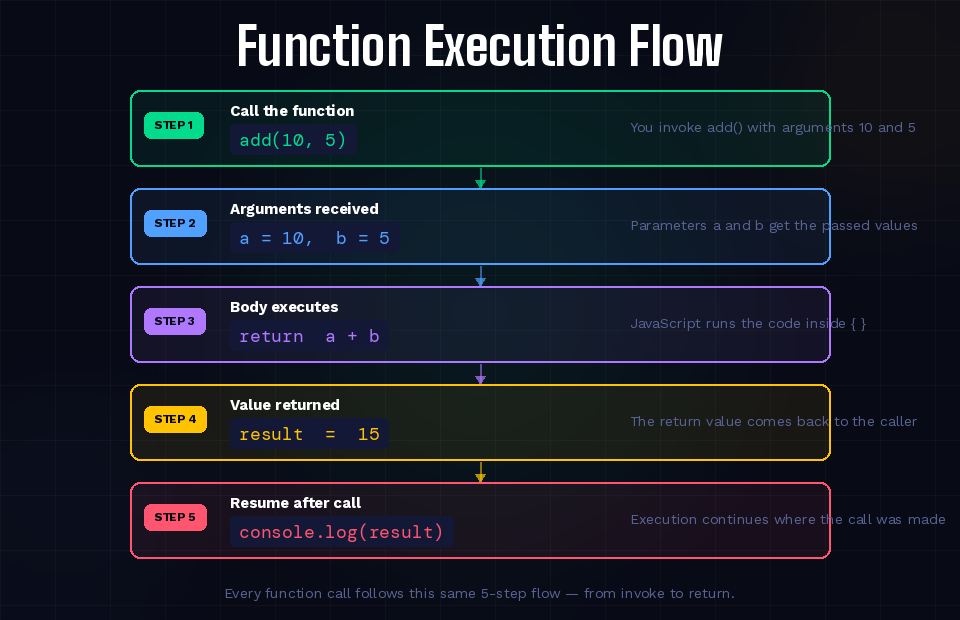
// Step 1: You call the function
const result = add(10, 5);

// Step 2: Arguments are received as parameters
// a = 10, b = 5

// Step 3: The body executes
// return a + b  →  return 10 + 5

// Step 4: The return value comes back
// result = 15

// Step 5: Code resumes after the call
console.log(result); // 15
🪄 Hoisting — The Big Difference
This is where declarations and expressions behave very differently.
Hoisting means JavaScript reads through your file before running it and moves function declarations to the top so they're available everywhere — even before the line where you wrote them.
With a Function Declaration — ✅ Works fine!
// Call it BEFORE it's defined — totally fine!
console.log(add(2, 3)); // 5  ← it works!

function add(a, b) {
  return a + b;
}
JavaScript hoisted the declaration automatically. It's like the function was already there from the start.
With a Function Expression — ❌ Error!
// Try to call BEFORE defining — breaks!
console.log(multiply(2, 3)); // ❌ TypeError: multiply is not a function

const multiply = function(a, b) {
  return a * b;
};
Why does this fail? Because multiply is a variable. JavaScript knows the variable exists (it was hoisted), but the function hasn't been assigned to it yet at that point.
💡 Simple rule: With a declaration, you can call it anywhere. With an expression, you must define it first, then call it.
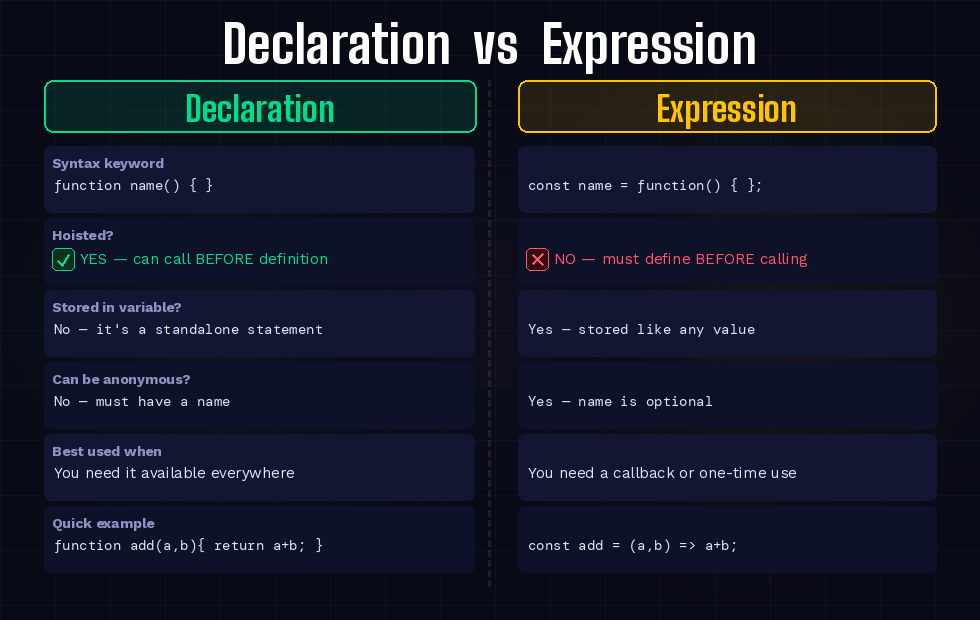
📊 Declaration vs Expression — Side by Side
🔀 When to Use Each One
Use a Function Declaration when:
The function is a core utility used everywhere in your file
You want the flexibility to call it from anywhere (before or after its definition)
You're writing standalone helper functions like
calculateTax(),formatDate()
function calculateTax(price, rate) {
  return price * rate / 100;
}
Use a Function Expression when:
You're passing a function as an argument to another function (callback)
You're writing a one-time or conditional function
You want to use the concise arrow function syntax
const numbers = [1, 2, 3, 4, 5];

// Function expression as a callback
const doubled = numbers.map((n) => n * 2);
console.log(doubled); // [2, 4, 6, 8, 10]
✍️ Practice Assignment
Try all 4 tasks in your browser console (F12 → Console) or on jsfiddle.net.
Task 1 — Write a Function Declaration
function multiply(a, b) {
  return a * b;
}

console.log(multiply(4, 5));  // 20
console.log(multiply(3, 9));  // 27
Task 2 — Write the Same as a Function Expression
const multiplyExpr = function(a, b) {
  return a * b;
};

console.log(multiplyExpr(4, 5)); // 20
console.log(multiplyExpr(3, 9)); // 27
Task 3 — Call both and compare results
// Both give the same result — but written differently
console.log(multiply(6, 7));     // 42
console.log(multiplyExpr(6, 7)); // 42
Task 4 — Test hoisting behaviour
// Try calling the declaration BEFORE defining it
console.log(multiplyDecl(2, 3)); // ✅ What happens?

function multiplyDecl(a, b) {
  return a * b;
}

// Now try the expression BEFORE defining it
console.log(multiplyExpr2(2, 3)); // ❌ What happens?

const multiplyExpr2 = function(a, b) {
  return a * b;
};
What you'll observe: The declaration works. The expression throws a TypeError. This is hoisting in action!
🎯 Quick Recap
A function is a reusable block of code — write once, call many times
Function declaration uses the
function name() { }syntaxFunction expression stores a function in a variable:
const fn = function() { }Arrow functions are a short form of expressions:
const fn = () => { }Hoisting means declarations are available before they're written; expressions are NOT
Use declarations for general utilities; use expressions for callbacks and short functions